
Create Tech Packs faster without repetitive work
Finally, a better way to build tech packs in Adobe Illustrator
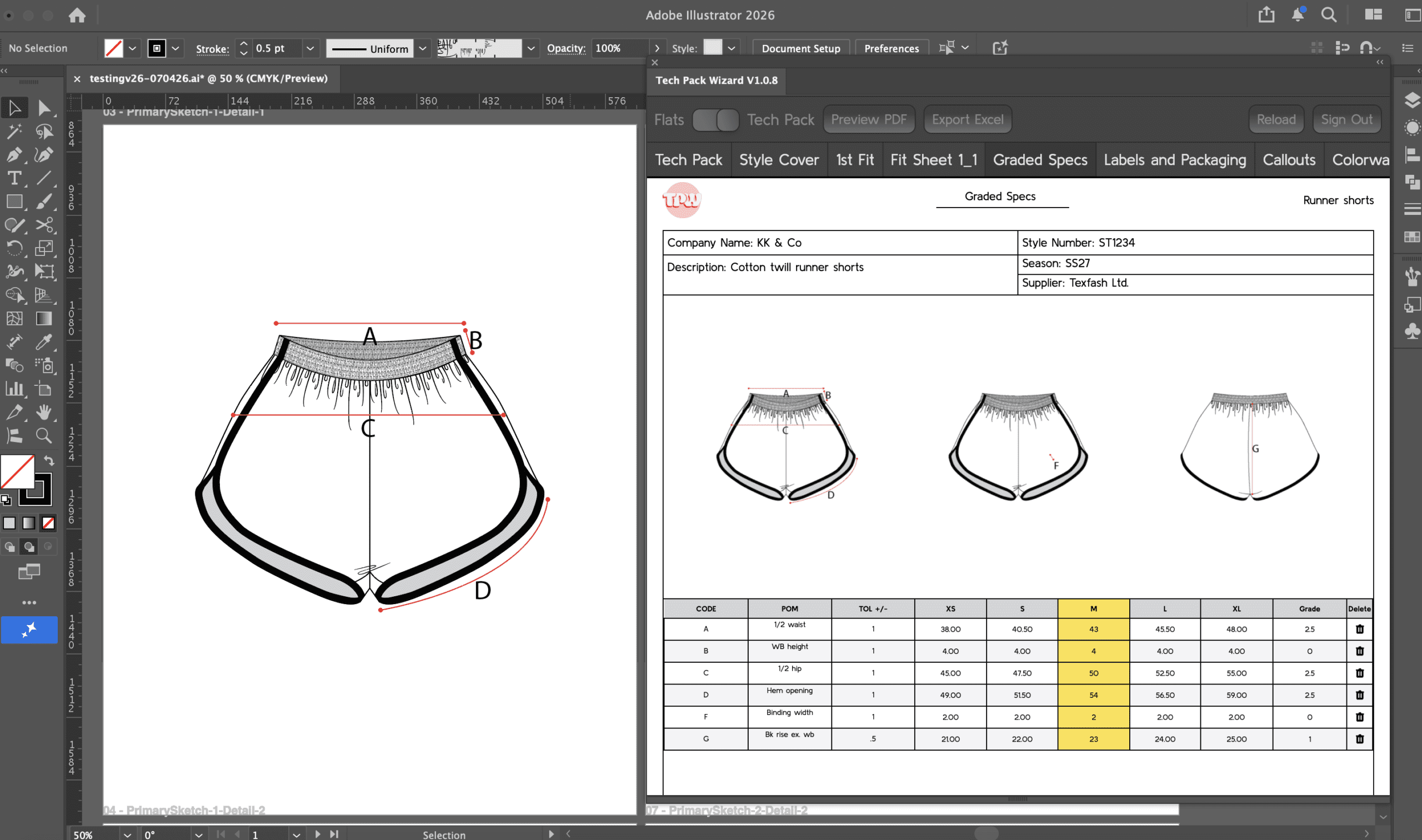
Tech Pack Wizard works inside Adobe Illustrator to connect your sketches and tech pack pages so updates happen automatically.
Make a change once and see it update everywhere.
No exporting. No re-placing images. No jumping between tools.
Join the waitlist to be the first to know when we launch.
No spam. Just product updates.
Create Tech Packs faster in Adobe Illustrator
Stop switching to Excel. Join the waitlist for early access to the Illustrator plugin.
No spam. Just product updates.
Tech pack admin is not just slow. It is exhausting.
The real cost is not just time
Constant context switching between Illustrator and Excel
Replacing the same sketch across multiple tech pack pages
Double (or triple) checking everything just to avoid mistakes
Losing focus every time you switch tools
You’re not just losing time. You’re losing momentum.
And honestly… sometimes your sanity too.
It's not you. It's your workflow
Most designers already know what goes into a tech pack
The problem isn’t creating the tech pack. It’s maintaining it when things change.
One small update can mean:
Updating the sketches
Fixing measurements
Replacing callouts
Copy/pasting multiple screenshots
Hoping you didn’t miss anything
When you’re fighting your tools, even small changes feel overwhelming.
What if everything updated automatically?
Update once. Everything stays in sync.
Tech Pack Wizard connects your sketches and detail pages so updates flow through your entire tech pack.
No more repeating the same task.
No more checking every page.
No more switching between tools.
Key Benefits:
- Update once and see changes everywhere
- Stay inside Illustrator from start to finish
- Reduce context switching and mental load
- Keep every page consistent automatically
It gives you back time, focus, and mental space.
How Tech Pack Wizard Works
Built for how designers actually work
Step 1:
Set up your Primary Sketches
Step 2:
Link Detail Sketches to the Primary Sketches
Step 3:
Use the TPW tools to annotate the Detail Sketches
Step 4:
Fill out information in tech pack pages
Step 5:
Update Primary Sketches and everything stays aligned
Step 6:
Export tech pack to PDF or XLSX
No new system to learn. No external tools to manage.
Get in first
Join the waitlist to be first in line
Built from a real frustration
This started as a personal problem
Designing stopped being fun.
Every change meant more admin. More repetition. More time spent updating instead of creating.
That constant back and forth between Illustrator and Excel.
That late night double checking everything.
That feeling of knowing one small change would take way longer than it should.
Tech Pack Wizard was built to fix that.
Frequently Asked Questions
Q: When is Tech Pack Wizard launching?
We are launching soon! Join the waitlist to be notified the exact moment we go live so you can get immediate access.
Q: Do I need to learn new software?
No new software, just a few simple tools. Tech Pack Wizard runs right inside Illustrator. While it adds a few specific tools, they use familiar Illustrator mechanics (similar to the the Pen or Line tool), so you’ll feel right at home immediately.
Q: Is this a plugin?
Yes! It is a panel extension built for Adobe Illustrator, meaning it lives directly inside your workspace so you never have to leave Illustrator.
Q: Who is Tech Pack Wizard for?
Freelance fashion designers, technical designers, and apparel brands who build tech packs in Adobe Illustrator.
Be first to create tech packs without the extra mental load
Join the waitlist for early access
Adobe and Illustrator are either registered trademarks or trademarks of Adobe in the United States and/or other countries