It’s not just slowing you down. It’s stressing you out.
We’ve all been there. A client comes back with a change and this causes a domino effect of tasks that never seem to be linear.
You hop into Adobe Illustrator to start updating the sketch, which makes you realise you need to add that trim into the Bill of Materials. You switch to Excel to update the BOM, go back into Illustrator, and now can’t remember what else you needed to update on the sketch.
Sound familiar?
This is classic context switching. Changing your work environment, in this case changing apps, or shifting what task you’re focusing on. And the effects of this switch are deeper than they might seem.
Not only does it waste time, but it can affect your focus, your stress levels and your overall mental energy. No one wants that.

What is context switching?
Context switching is the process of averting your focus to another task before completing what you were working on.
It’s like when you walk into the kitchen to get a glass of water, but realize you forgot to wash the dishes. So you start washing the dishes, but there are no clean towels to dry them as you go. Which leads you into the laundry room to grab the clean load from the dryer, only for you to notice there’s a trash bag waiting to be taken out because the bins haven’t been brought in from the street. Thirty minutes go by and you still haven’t had your glass of water. Sounds like a WFH freelancer’s water break to me!
The same thing happens at work. You’re deep in your tech pack, thinking through the construction details of your design, trying to anticipate any questions the factory might have in production and how to avoid problems before they arise. That line of thinking makes you remember you’re waiting on an email from that factory. So you open your inbox to check, end up reading through other emails, and when you get back to the tech pack your brain has to reconstruct that entire thought process from scratch. More time gone. More mental energy spent.
Sound familiar? It happens in smaller ways too. Stopping mid-sketch to read an email that popped up. Opening the browser to look up a reference image and somehow ending up on Instagram scrolling for “inspiration.”
Each time you ask your brain to switch gears like this, it has to re-orient to the current task, like a computer reloading the data and logic necessary to understand and execute something new. That effect adds unnecessary time to your workflow. Although the time strain feels small for each individual task switch, the effects last much longer.
The time cost most designers already know about
Research by Gloria Mark at the University of California, Irvine found it takes an average of 23 minutes to fully regain deep focus after a single interruption. 23 minutes! So while it might only take 15 seconds to read that notification that just popped up, it will take your brain so much longer to get back into the flow. And the flow is where we want to be.
This is especially relevant if you’re switching back and forth between Adobe Illustrator and an external app to build your tech pack. Each time you switch, your brain has to re-orient itself. Different shortcuts, different layout, different logic entirely.
So on top of the time it takes to actually go from one app to another and back again, your brain is also in a constant state of having to refocus. This uses up precious mental energy.
How much time is that adding up to over the course of a project? Over the course of a month? And how much extra mental energy are you expending just to maintain this workflow?
I know firsthand how exhausting this is. Switching from Illustrator to Excel. Stopping to check emails. Opening a browser that already has 50 tabs open to look something up for the tech pack. It’s tiring just thinking about it.
The part nobody talks about: the stress cost
Switching between tools doesn’t just cost time. It affects how you feel. More frustrated, more scattered, like you’re spinning your wheels. Ending the day feeling like you weren’t productive, even when you were flat out all day.
That doesn’t sound like a motivating work environment.
A recent poll of freelance fashion designers found that 70% agreed that tech pack admin cost them their sanity above all else. Not money, not clients, not time. Their sanity. I’m not surprised.
The cognitive shift between creative design work and technical admin work is particularly jarring. These aren’t just different tools. They’re fundamentally different ways of thinking. It’s a massive shift to move from one mode to the other, and fashion designers creating tech packs have to make that switch constantly throughout their day.
Why the Adobe Illustrator to external tool switch hits differently
I don’t know about you, but when I’m sketching in Illustrator I sometimes feel like I’m in a different dimension. Time does not exist. I forget to blink. I am in the FLOW.
Asking me to stop that to go check a formula in an Excel sheet should be illegal.
Going from creative, fluid Illustrator to sterile, number-land Excel is actually a double context switch. You’re changing tools and brain modes at the same time. Big record scratch moment.
For designers who create multiple tech packs a week, this is an everyday occurrence. A constant drag on workflow that many fashion designers have simply been resigned to accept.
What you can do about it
You know it in your bones that you need to make some changes to reduce context switching in your workflow, for the sake of your own sanity.
Here are a few easy-to-implement tips to help minimize context switching in your day-to-day:
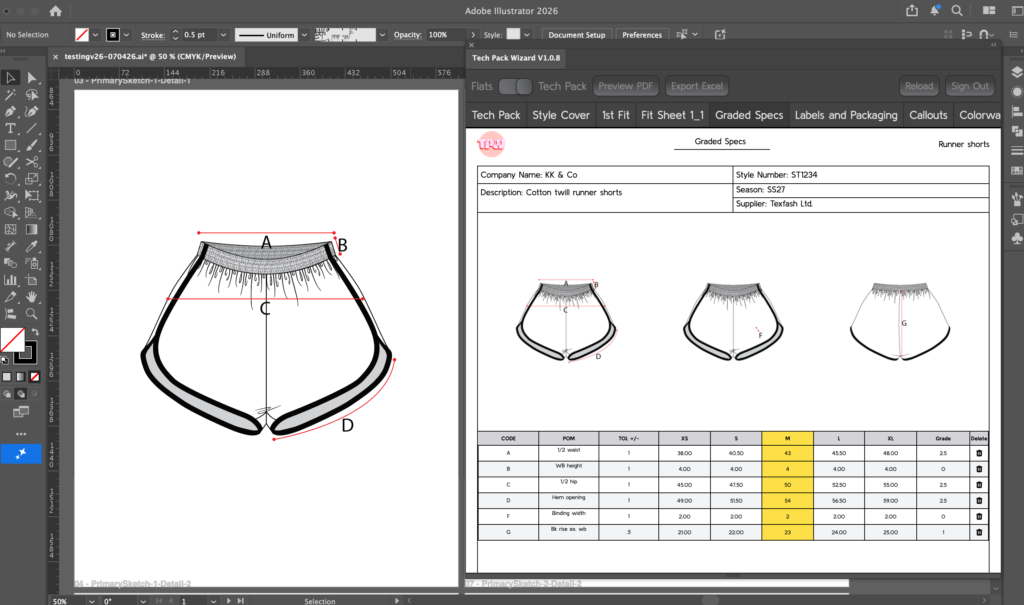
- Consolidate your tools: The most obvious focus breaker is jumping between apps, from your browser to Illustrator to Excel to email. Streamline these where you can. Bringing your entire tech pack process into Adobe Illustrator and ditching Excel is one of the most effective moves you can make. Tech Pack Wizard, the plugin for Adobe Illustrator software, makes this possible.
- Work in focused blocks: Break your day into chunks where you focus on one task at a time. Give it your full attention before moving on, and if you need a break, stop at a natural stopping point. Finish the sketch before you get up for more coffee. You can also schedule these blocks to coincide with your natural productivity peaks. Research shows that for many people this is between 9–11am and 1–3pm, though your own rhythm may vary.
- Cut out notification interruptions: Use Do Not Disturb. Set up an internet blocker. Find the method that suits you best. Notifications are attention thieves. One literally popped up on my screen as I was writing this and my eyes went straight to it.
Stay in the flow
I get it, freelancers and small brand owners have to do everything in their business. Sometimes all at the same time!
But the quality of your work, and more importantly your emotional wellbeing at the end of the day, will thank you for taking steps to reduce interruptions and minimize context switching.
Tech Pack Wizard helps by eliminating the need for Excel or external tools when creating tech packs. Stay in Adobe Illustrator. Stay in the flow.