If you’ve been freelancing in fashion for more than five minutes, you probably have a tech pack template you use on repeat.
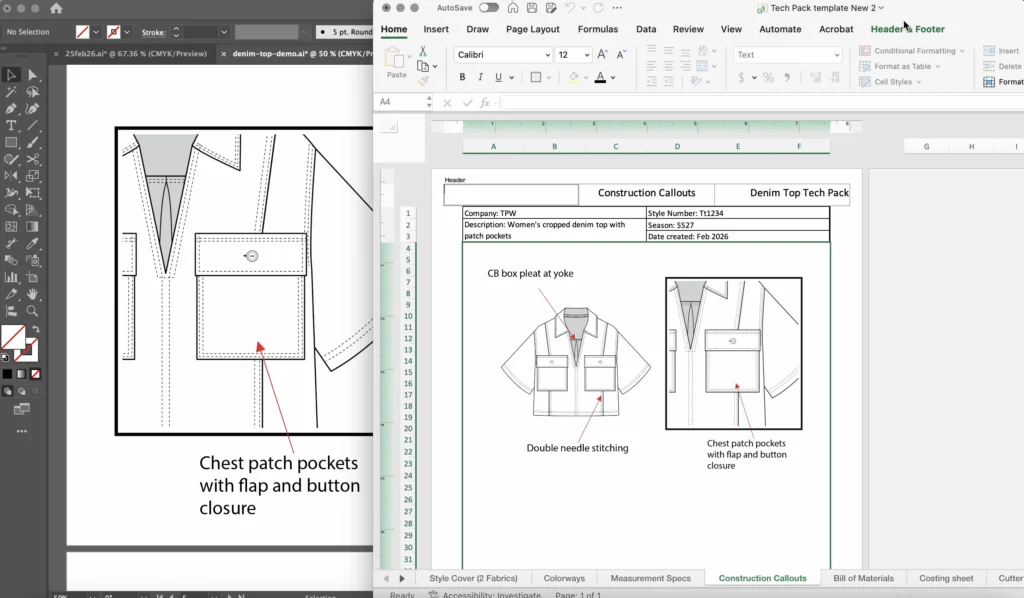
Maybe it’s an Excel tech pack file you’ve refined over the years. Maybe it’s an Adobe Illustrator document with your preferred layout already set up.
Either way, having a template feels like the smart move. And it definitely is! 100%!
Starting from a blank file every time would be madness.
But a template doesn’t always mean you open up the file and jump straight into the design work, does it? There’s usually a bit of time-wasting set up you have to do first.
You know how it goes. You open up your Excel tech pack template, and before you can even add the first sketch, you have to go through page-by-page and adjust it to fit the current style. It’s like when you’re getting dressed and you have to steam the top you’re excited about wearing before you can put it on!
If you’re still spending a significant chunk of time setting up each new tech pack, your template isn’t really solving the problem you want it to.
What a template actually gives you
I love a template. Big fan! I myself have created many templates over my years of freelancing.
A template gives you structure. Your column headers are already there. Your font and text size are set. Your general page layout is established.
You’ve saved time on these things!
For a lot of designers, it also provides a sense of consistency. Each tech pack at least starts from the same place, even if they don’t always end up looking the same (because we all know how things change along the development cycle).
That’s genuinely useful. A template is a better starting point than a fresh blank page.
And good on you for building one in the first place! That takes real effort and experience and I know it can be so satisfying.
But a template lacks one important thing… flexibility. Each design is so different. Your tech pack needs to reflect that and a template might not be set up to cover every scenario.
What you're still doing manually every single time
Here’s where the template stops saving you time and starts spending your time instead.
Every new style brings a different set of variables. Your size range changes. That women’s contemporary client runs 0 to 16, but the menswear project runs S to 3XL, and now your spec columns need rebuilding and the grading formulas need to be extended to the new sizes.
The number of callout pages varies depending on construction complexity. Now, you’re copying pages and deleting existing callout sketches to make space for the new ones.
The screenshots of your sketches still need to be pasted into the document and sized/positioned appropriately.
Your BOM needs more or fewer columns depending on how many colorways the style comes in. Adding columns in Excel sounds easy, but not when you’re trying to fit them into a pre-designed template. That header now has to be reworked to extend across all the new columns. And why does everything else change when you add a new column in Excel?!
None of this is unusual. It’s just how tech packs work.
Every style is different, which means every tech pack is different. A static template can only take you so far before you’re back to manually adjusting, reformatting, and restructuring.
And the more complex the job, the less your template actually helps. The styles that need the most careful documentation are the ones that need the most setup work.
The template trap
The template trap is believing that because you have a starting point, the setup problem is solved.
It isn’t. It’s just compressed.
Instead of building from nothing, you’re rebuilding from something. The adjustments still happen, they just happen inside a file that already exists.
And those adjustments are easy to underestimate because each one feels small.
Adjusting a column here, adding a row there, repositioning a sketch. None of it feels like a big deal in isolation.
But across a full tech pack, across multiple styles, across a whole year of projects? The time adds up in a way that’s almost impossible to track because it never shows up as one big task. It just quietly eats away at your day and, let’s be real, your sanity as well.
The maintenance problem nobody talks
There’s another layer to the template trap that doesn’t get mentioned enough: your template is never actually finished.
It reflects how you worked when you built it. But your process evolves. Constantly!
Your clients change. You take on a new category you haven’t worked in before. A factory comes back with feedback that makes you rethink how you’ve been presenting information. You figure out a better way to do something you’ve been doing the same way for years.
Each of those moments sends you back into the template to update it.
And that maintenance work is invisible. It’s not billable, it doesn’t show up in your project time, and it’s easy to forget it’s even happening. It just quietly sits on top of everything else you’re already doing.
The template is never done. It’s just done enough for now.

What a smarter workflow actually looks like
The difference between a template and a smart workflow is flexibility. A template is fixed until you change it. A smart workflow adapts to the job.
That means structure that adjusts with your size range and number of colorways rather than requiring you to rebuild columns manually.
Pages that generate based on what the style actually needs rather than what you copied from the last job.
Sketches that are linked to your artwork rather than screenshots you’ve pasted and repositioned.
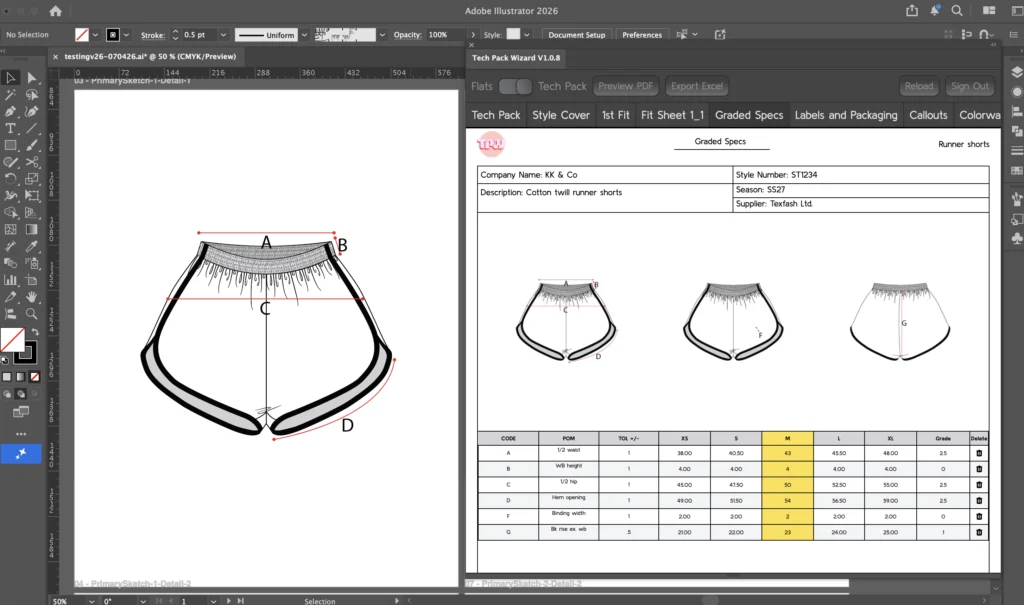
This is exactly what Tech Pack Wizard is built around.
Rather than giving you a static file to start from, it works dynamically inside Adobe Illustrator software, so your tech pack structure responds to your design decisions rather than the other way around. When, not if, the style changes, the tech pack keeps up.
The goal was never a perfect template
A good template is a workaround for a workflow problem. Sure, it reduces the time you spend on setup, but it doesn’t eliminate it.
The underlying issue isn’t that you don’t have a starting point, it’s that tech pack creation involves too many manual, repetitive decisions that have nothing to do with design.
The goal isn’t a better template but a workflow that doesn’t need one.